
1. Project Overview
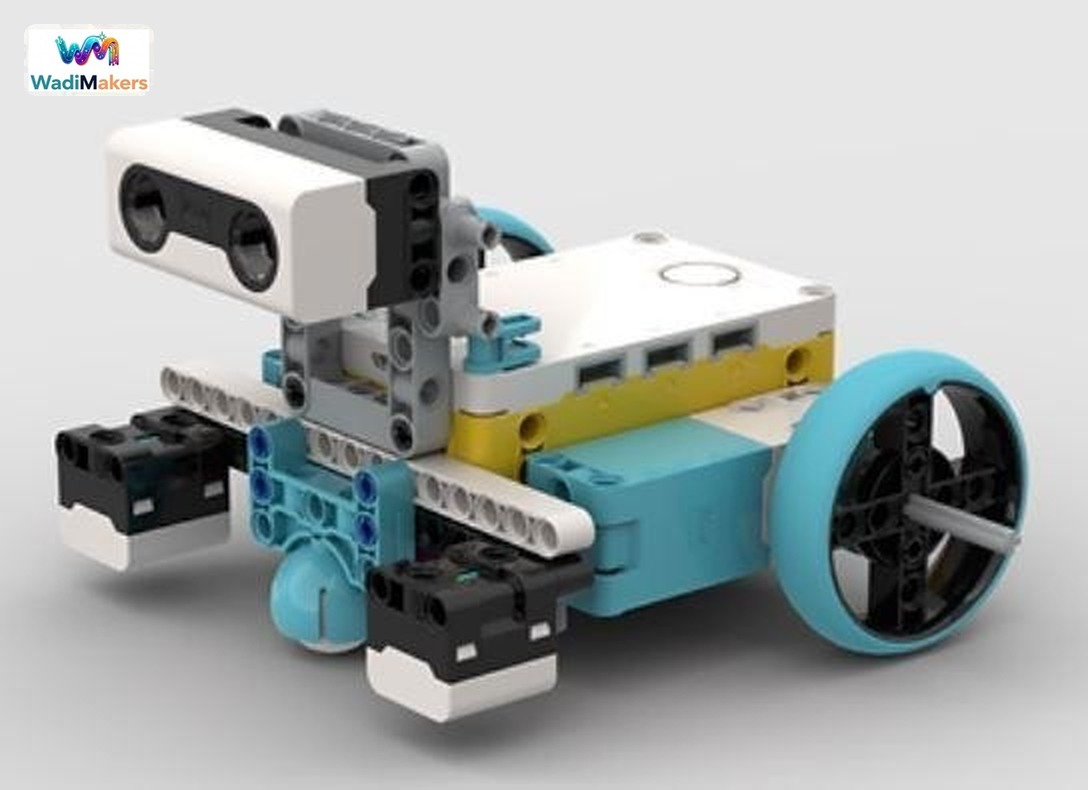
A small robot built from LEGO SPIKE Prime that drives forward and avoids obstacles. A distance sensor at the front measures the distance to the nearest object. When it is closer than a safe distance, the robot stops, backs up, turns and carries on. The program is built with Word Blocks in the LEGO Education SPIKE app, so no typing code is needed. It is a suggested, reproducible design, not a tested robot. No electronic parts or soldering are needed: everything plugs into the hub ports.
2. How It Works
On every loop the program reads the distance from the sensor in millimetres. If the object is farther than 20 cm, the robot keeps driving forward. If it is closer, the robot stops, backs up 10 cm and turns about 90 degrees, then the loop starts again. These numbers are starting values, not verified.
3. Components Required
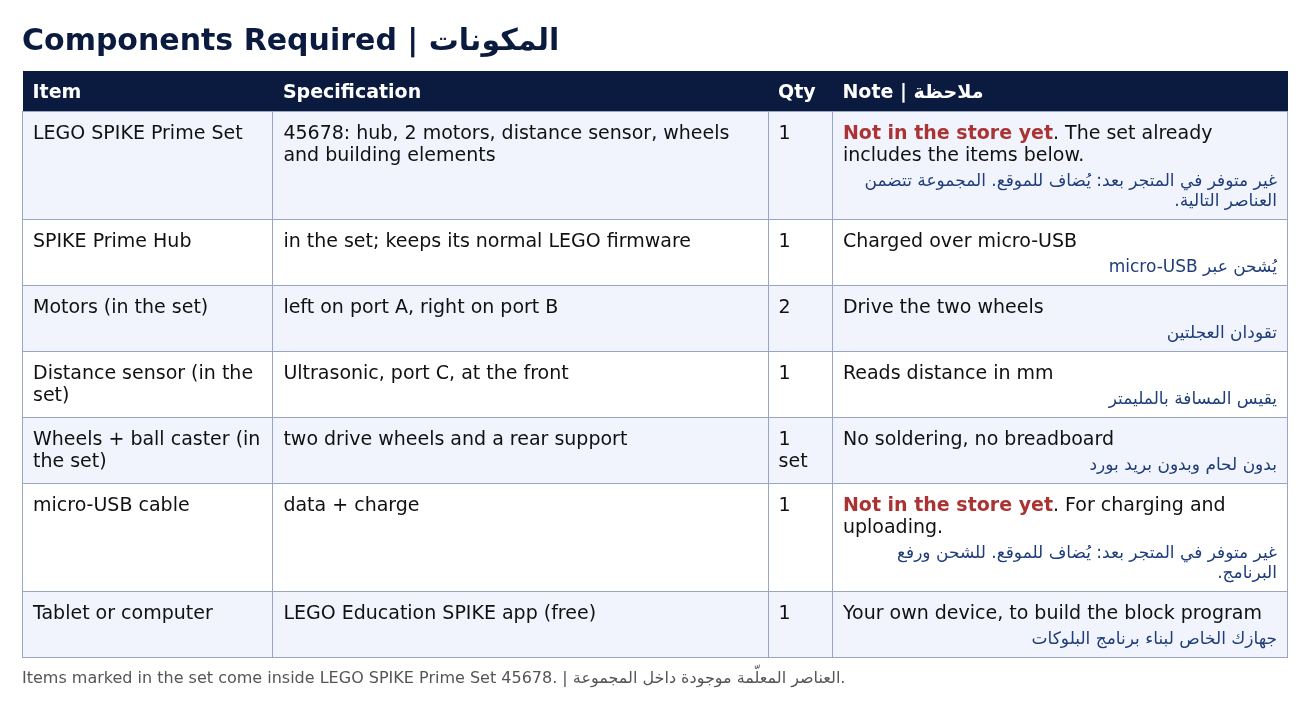
- LEGO SPIKE Prime Set 45678 (hub, 2 motors, distance sensor, wheels and building elements) x 1 - not in the store yet, to be added
- micro-USB cable for the hub (charging and uploading) x 1 - not in the store yet, to be added
- Tablet or computer with the free LEGO Education SPIKE app x 1 - your own device
Click here to open the components table
4. Circuit Diagram
There is no breadboard in this project. The left motor goes to port A, the right motor to port B and the distance sensor to port C. The two colour sensors seen in the photo are not used by the program.
Click here to open the connection diagram
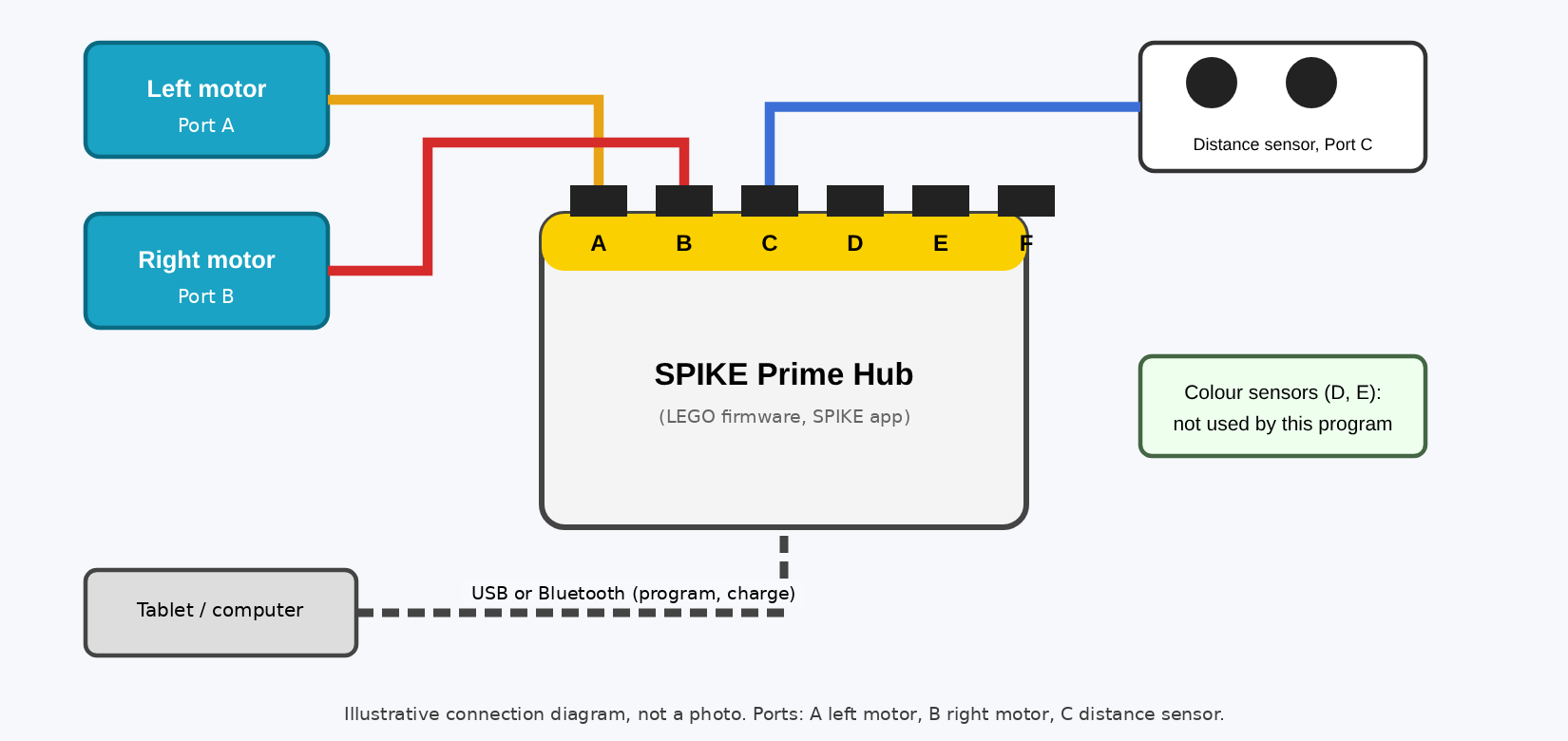
This is a teaching diagram, not a photo of a tested build. The robot photo is a render provided by WadiMakers.
5. Wiring Table
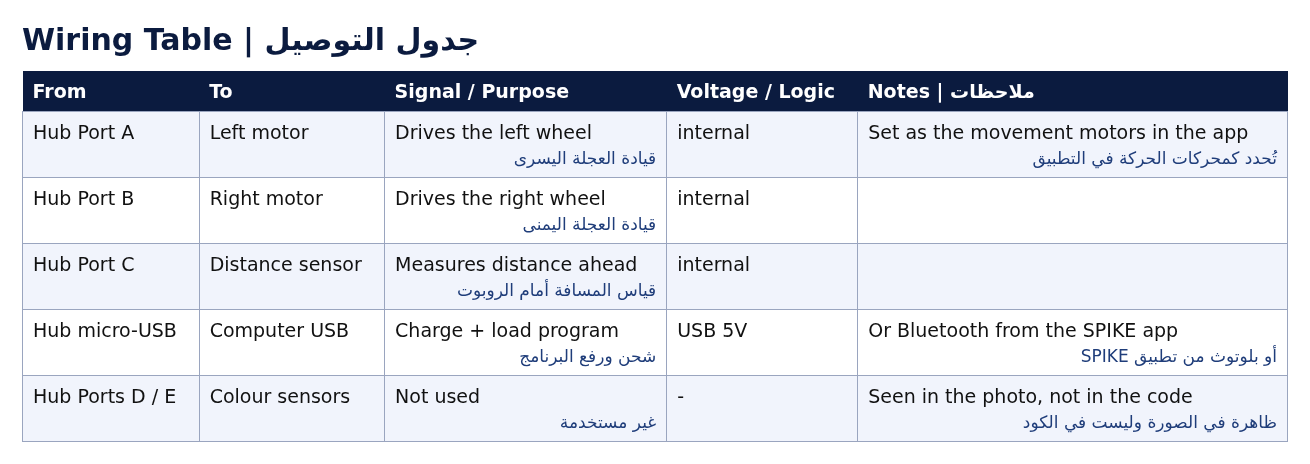
Read each row from the From port to the To part. Everything plugs into the hub, with no loose wires.
Click here to open the wiring table
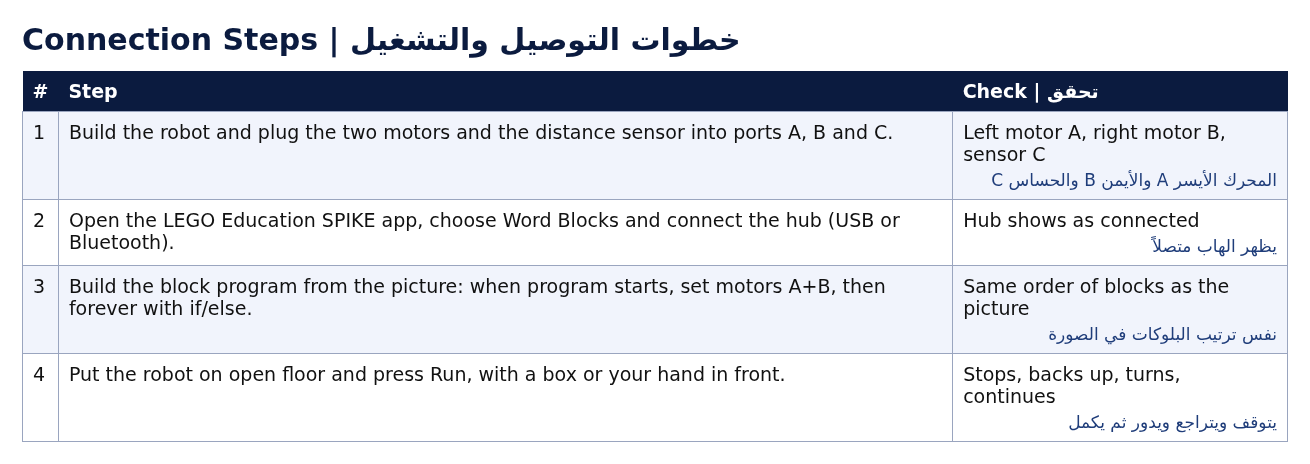
6. Connection Steps
Follow these steps in order. The table has the same steps with a check for each.
- Build the robot and plug the two motors and the distance sensor into ports A, B and C.
- Open the LEGO Education SPIKE app, choose Word Blocks and connect the hub with USB or Bluetooth.
- Build the block program from the picture in section 7: when program starts, set the movement motors, then forever with if / else.
- Put the robot on open floor and press Run. Put a box or your hand in front of it to test the avoidance.
Click here to open the connection steps table
7. Block Program (SPIKE App)
The program uses Word Blocks in the LEGO Education SPIKE app: when program starts, set the movement motors to A + B and the speed, then a forever loop with an if / else. If the distance sensor is closer than 20 cm: stop moving, move backward 10 cm, then move with steering to turn. Otherwise: start moving forward. Tune the turn time until the robot turns about 90 degrees on your floor.
Click here to open the block program picture
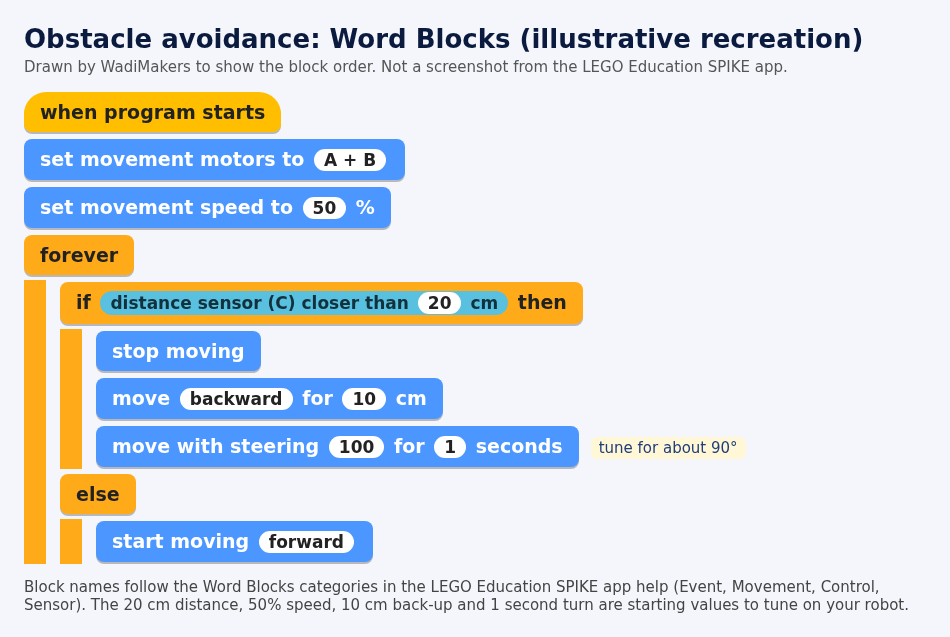
Important: this picture is an illustrative recreation drawn by WadiMakers to show the block order. It is not a screenshot from the SPIKE app, and the program has not been tested on the robot yet. Block names follow the Word Blocks help of the LEGO Education SPIKE app (spike.legoeducation.com/prime/help/lls-help-word-blocks).
Optional: the same logic in Python (Pybricks)
This is for advanced users only. It needs the Pybricks firmware on the hub (it replaces the LEGO firmware, and you can go back) and code.pybricks.com in Chrome. The code was written by WadiMakers using the Pybricks API, not copied, and is not tested yet. Wheel diameter (56 mm) and axle track (112 mm) are defaults to measure.
# obstacle_avoidance.py
# Pybricks (Python) for LEGO SPIKE Prime Hub
# Drives forward. When the distance sensor sees an object closer than
# SAFE_DISTANCE, the robot stops, backs up, turns, and continues.
from pybricks.hubs import PrimeHub
from pybricks.pupdevices import Motor, UltrasonicSensor
from pybricks.parameters import Port, Direction
from pybricks.robotics import DriveBase
from pybricks.tools import wait
SAFE_DISTANCE = 200 # mm, start avoiding below this
DRIVE_SPEED = 150 # mm/s
BACK_DISTANCE = 100 # mm
TURN_ANGLE = 90 # degrees
hub = PrimeHub()
left_motor = Motor(Port.A, Direction.COUNTERCLOCKWISE)
right_motor = Motor(Port.B)
eyes = UltrasonicSensor(Port.C)
# wheel_diameter and axle_track in mm: measure your robot.
robot = DriveBase(left_motor, right_motor, wheel_diameter=56, axle_track=112)
turn_direction = 1
while True:
if eyes.distance() > SAFE_DISTANCE:
robot.drive(DRIVE_SPEED, 0)
else:
robot.stop()
robot.straight(-BACK_DISTANCE)
robot.turn(TURN_ANGLE * turn_direction)
turn_direction = -turn_direction
wait(20)
8. Testing & Troubleshooting
- Free path: no obstacle; the robot drives straight.
- Obstacle: put a box in front; it stops, backs up, turns and continues.
- Alternate turn: two obstacles in a row; it turns in opposite directions.
- Wrong direction: if it goes backwards, swap the motor directions in the app or check that A is left and B is right.
- Drifts: if it does not go straight, check the wheels and that both motors are set as A + B.
- No reading: check port C or try another sensor.
- Battery: charge the hub if the motion gets weak.
9. Improvements
- Use the two colour sensors to follow a black line.
- Use the hub buttons or bumpers for obstacles the sensor misses.
- Show the distance on the hub light matrix.
- Add a sound or light when an obstacle is seen.
10. Safety
The block program, ports and robot dimensions are not verified until the project is built and tested. Keep the robot away from table edges while it runs. Sources: LEGO Education SPIKE app Word Blocks help (spike.legoeducation.com/prime/help/lls-help-word-blocks) for block names, and pybricks.com and docs.pybricks.com for the optional Python. No images were copied from LEGO or Pybricks.
Comments & discussion (0)